

How to install APK, APKs and XAPK files?
When downloading games or applications from FUZYAPK.COM, you will need to install them on your device before you can use them. If you are not familiar with this process, don’t worry — the installation is actually very simple. In the guide below, FUZY APK will show you how to install apps quickly and safely.
On FUZY APK, applications are usually shared in several common formats such as APK, APKs, and XAPK. Each format has a slightly different installation method, so before getting started, it’s helpful to understand the basics of these file types. Let’s take a quick look at these formats so you can install your apps more easily.
Understanding APK, APKs, and XAPK Formats
These are the most common package formats used to distribute Android applications outside of the Google Play Store.
What is APK?
APK (Android Package Kit) is the simplest file type for Android applications. It works like an installation file, allowing you to install apps directly on your phone or via an Android emulator on a PC.
What are APKs?
APKs files are compressed ZIP packages that contain multiple split APK files generated from Android App Bundles. They are usually smaller than traditional APKs because they only include the components required for your specific device. To install APKs files, you will need a special installer app (such as XAPK Installer or similar tools).
What is XAPK?
XAPK is similar to APK but includes additional data (OBB files) inside the package. This format is commonly used for larger applications or games that require more resources.
Installation Guide
Tip: To avoid installation being blocked, you may need to temporarily disable Play Protect in Google Play settings.
Installing APK Files
Follow the steps below to install an .apk file from FUZYAPK:
1. Download the .apk file from
FUZYAPK.COM.
2. Open the downloaded file on your device.
3. When prompted, tap Install.

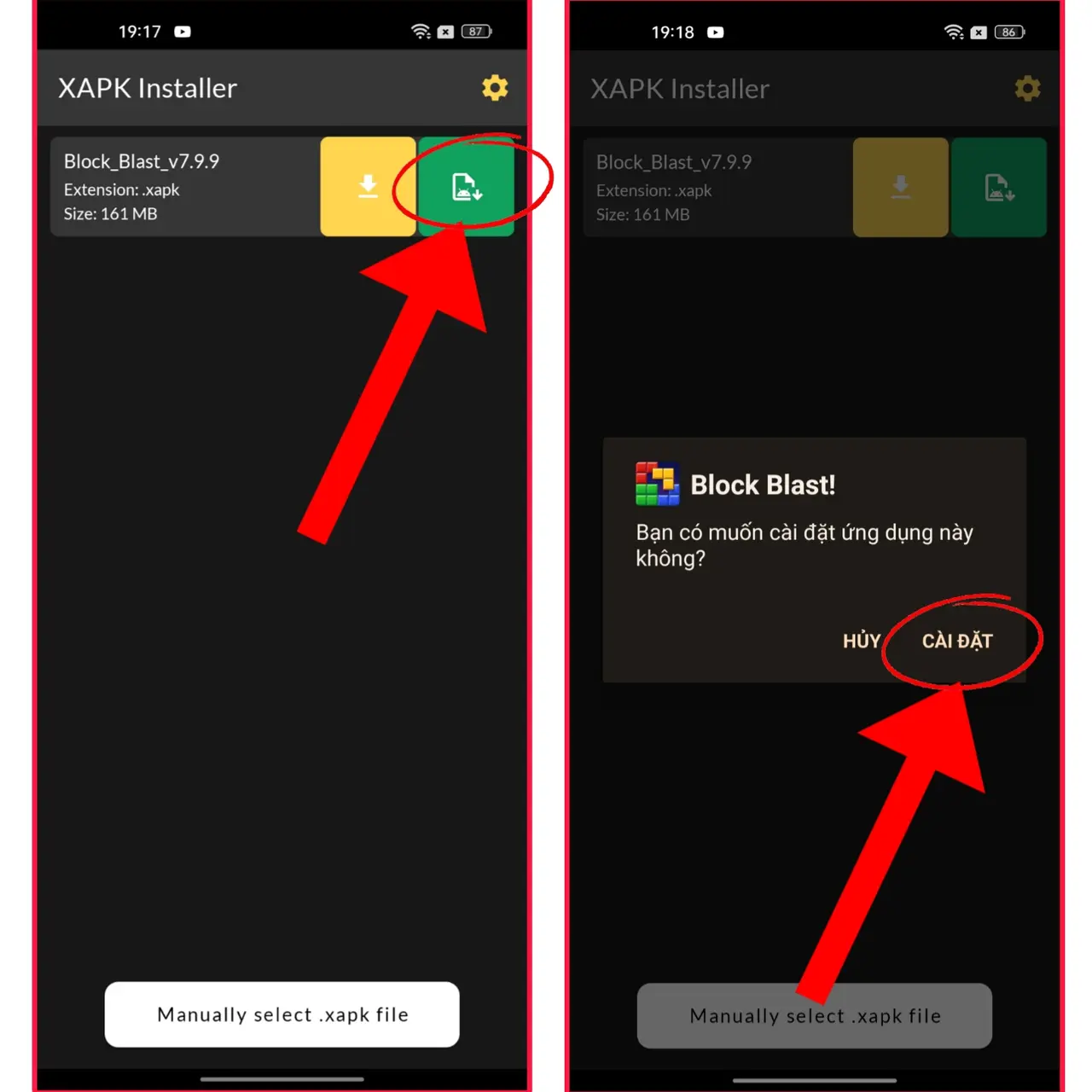
Installing XAPK or APKs Using XAPK Installer
First, install the XAPK Installer application on your Android device.
1. Open XAPK Installer and select Install.
2. Browse to the downloaded .xapk or .apks file
and tap Select.
3. When the installation dialog appears, tap Install
to complete the process.
Common Issues
Installation is usually straightforward. However, if you encounter errors, please refer to our guide on common installation issues and how to fix them.
Conclusion
That’s it! Just follow the steps above to easily install APK, APKs (App Bundle), and XAPK files. If you have any questions or suggestions, feel free to contact us via the About page. Thank you for reading!